Open Source EHRs and Security
May 13th, 2009 Posted in Health Care IT | No Comments »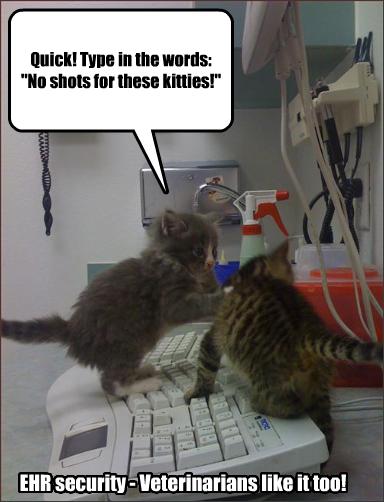
Woe to the unsuspecting Veterinarian not using proper species biometric logins!
(Absolutely couldn’t resist)
Woe to the unsuspecting Veterinarian not using proper species biometric logins!
(Absolutely couldn’t resist)
A Brief, Incomplete, and Mostly Wrong History of Programming Languages posted by James Iry is a wonderfully funny, and irreverent look at software development. My favorite?
1987 - Larry Wall falls asleep and hits Larry Wall’s forehead on the keyboard. Upon waking Larry Wall decides that the string of characters on Larry Wall’s monitor isn’t random but an example program in a programming language that God wants His prophet, Larry Wall, to design. Perl is born.
Yup, that’s Perl. 

Apple IIe. Image from a New Zealander aficionado of classic computers: (http://classic-computers.org.nz/)
I see Mr. Obama’s group seems to believe in the use of Drupal.
Don’t ya just love leadership by example?
Perhaps the notion of open source EHRs is really on a roll. The Dept of Defense and Veterans Health Administration have long been criticized for the lack of interoperability between their 2 healthcare systems. The VHA is open source and the DoD has been proprietary. Now, in a stunning turn of events, it sounds like they are thinking about having a more open EHR for the DoD.
Let’s see, we’ve now seen a US Senator, the Wall Street Journal and now even the land of proprietary procurement purchases talking about open EHR systems. What next?
The VHA’s home-grown electronic healthrecord system is open source (through the Freedom of Information Act) and freely available to anyone who wants to download it from the VHA’s website. The Wall Street Journal has recently suggested it might be a viable solution for medical facilities seeking a lower cost alternative to proprietary EHRs. (Those of us VistA watchers have been saying this for a long time.)
Looks like somebody heard about the potential for this in healthcare. See the info on latest legislation introduced by Rockefeller D-WV.
BTW, a group of public clinics in West Virginia has implemented a variation of the VHA’s open source VistA system, called RPMS and there has been some positive feedback coming out of the project. This is a good example of what I call “VistA in the Wild” - the system being adopted outside it’s native environment at the VHA. This is significant since a barrier to this has been the fact that th VHA is different in ways from the public healthcare sector and the system has had to be adapted for use. This is something that bears close watching. Maybe people out there are “getting it”.
Hi Betty!, and to all those LinuxChix and LinuxGuys who need to recover files
or partitions off dead flash drives, usually fried by Windows, or any hard drive
or removable media
Here is the website for the TestDisk and PhotoRec software that
was used to recover your flash drive in Linux at our last LinuxChixLa meeting at
Philippes:
http://www.cgsecurity.org/wiki/Main_Page
It is also available for Windows and Mac OSX.
To install and run TestDisk and PhotoRec In Ubuntu Linux:
“sudo apt-get install testdisk” from a terminal and then run
“sudo testdisk” or “sudo photorec”
Both the photo recovery program and test disk are included in the
debian package.
The PhotoRec software is what was used to recover the files off your
dead flash drive. It will recover many types of files, not just multimedia
The detailed instructions for running PhotoRec are demonstrated on the
PhotoRec main site:
http://www.cgsecurity.org/wiki/PhotoRec_Step_By_Step
TestDIsk/PhotoRec is usually faster at data recovery than Ddrescue, but
Ddrescue is more thorough and efficient:
http://www.gnu.org/software/ddrescue/ddrescue.html
Ddrescue and fdisk is what I always used to use until Chad gave us the heads-up
on TestDisk
Knoppix Linux Live CD has TestDisk/PhotoRec and Ddrescue already installed!
Here are the instructions for using these utilities in Knoppix:
http://www.cgsecurity.org/wiki/Damaged_Hard_Disk#Booting_from_Knoppix.2C_a_Linux_LiveCD
The Ubuntu Rescue Remix Live CD (http://ubuntu-rescue-remix.org/) is also a great option. It includes TestDisk and Ddrescue as well.
And the Ultimate Boot CD (http://www.ultimatebootcd.com/), one of my favorite
boot cds, includes TestDisk as well.
Have fun recovering files
/JilliX
April summer day
Welcome gathering Philippes
Heidi gone too soon


I ‘fess. I’m a packrat. I save everything. And since I’m ‘fessing things, I admit to not having a good system, well, ANY system, to archive digital files.
When I either change or upgrade my hardware I’ve copied my old home directories and saved them in their entirety as a archive folder in my new fresh clean home directory, and then move individual files up to work on them as needed. The plan was always to go back and systematically organize and consolidate the contents. Which never happened.
The folly of my packrat ways was highlighted when I made a backup of the files on my penultimate computer to an external usb harddrive in preparation to wipe and install a home server. Well, 5 hours and 25 GBs later the archived home directories from my last five computers finished the transfer.
So my external drive now contains the nested archived home directories from:
-> hardy.laptop
—> gutsy.laptop
—-> dapper.desktop
——-> redhat73.desktop
———> windows98.desktop
So I’ve learned that I have to Organize, Consolidate, and Delete: a.k.a. OCD 
They are having way to much fun in Sweden!
I guess now we know what’s keeping Pirate Bay going!
 LinuxChix Akkana Peck’s Musings on Open Source, Science, and Nature ROSE :: Rikki’s Open Source Exchange Geek Feminism